

Booking workflow for Airbnb owners: streamline rentals
TL;DR:
Maintaining a professional, integrated workflow for Airbnb bookings reduces errors, improves guest satisfaction, and increases revenue. Implementing real-time API sync, automated messaging sequences, and online cleaning management protects against double bookings and operational failures. Professional management services streamline these processes, allowing hosts to focus on providing high-quality guest experiences.
If you own a short-term rental and still rely on scattered spreadsheets, manual texts to cleaners, and inbox dread every Sunday night, your booking workflow for Airbnb owners is costing you real money. Missed messages drop your response rate. Uncoordinated turnovers cause bad reviews. Slow calendar updates across platforms invite double bookings. The good news is that a professional, end-to-end workflow fixes all of this, and this guide walks you through exactly how to build one, from tool selection and messaging sequences to cleaning automation and inbox management.
Table of Contents
Preparing your tools and strategies for an efficient booking workflow
Setting up a proven Airbnb guest messaging sequence to reduce inquiries
Automating cleaning and turnover tasks to save time and avoid errors
Ensuring booking and message response performance to protect listing health
Rethinking Airbnb booking workflows: beyond templates to intelligent management
Streamline your Airbnb booking workflow with Nestoria Estates services
Key Takeaways
Point | Details |
Use integrated tools | Combine Airbnb’s scheduled messages with AI-assisted inbox management to handle both outbound and inbound guest communication efficiently. |
Implement a 5-step messaging sequence | Send carefully timed messages from booking confirmation through checkout reminders to reduce guest questions and improve reviews. |
Prefer API over iCal for syncing | API sync provides near-real-time updates that prevent double bookings and support advanced pricing strategies. |
Automate cleaning with calendar integration | Use your Airbnb iCal export with cleaning automation tools to streamline turnover tasks and reduce manual coordination. |
Respond to guests promptly | Fast replies to inquiries within 24 hours protect your listing’s health and help maintain Superhost status. |
Preparing your tools and strategies for an efficient booking workflow
Before you can run a tight booking workflow, you need the right foundation. That means making deliberate choices about your booking settings, calendar management, and communication infrastructure, not just defaulting to whatever Airbnb set up for you.
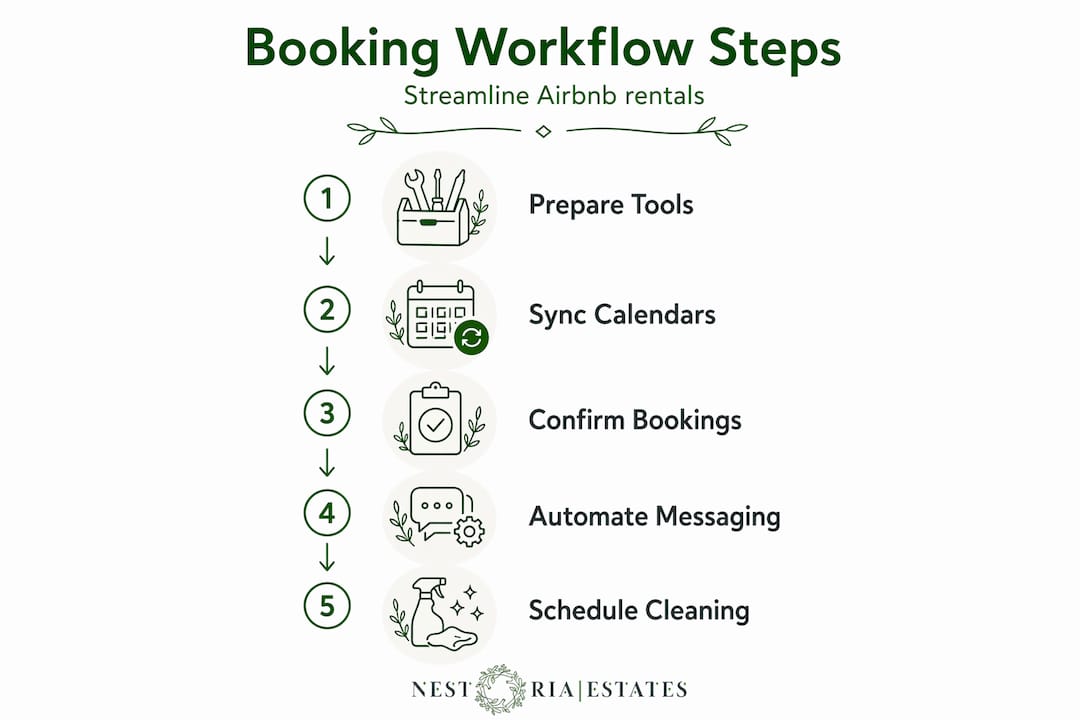
Booking settings: Instant Book vs. Request to Book
This is the first fork in the road. Instant Book reduces approval workload but Request to Book allows more guest vetting at the cost of additional management tasks. Neither is universally better. If you own a high-demand urban condo in Vancouver or Toronto, Instant Book fills your calendar faster and reduces friction for travelers. If you manage a large property with strict house rules or expensive furnishings, the extra screening from Request to Book may be worth the added workload.
Calendar synchronization: iCal vs. API
Most owners default to iCal sync across platforms because it is built in and free. The problem is that iCal refresh intervals of 2 to 6 hours create a risk window for double bookings, while API sync offers near-instant updates to reduce this risk. If you list on multiple platforms, an API-based connection through a property management system (PMS) is the only reliable option. Think of iCal like checking your email every few hours versus getting a text the moment something arrives.
The inbound messaging gap
Here is where most owners get tripped up. Airbnb Scheduled Messages only support outbound templates at fixed trigger points but cannot respond to inbound guest queries. This means your beautiful automated welcome message goes out perfectly, but when a guest replies asking about parking, you are back to answering manually. You need a separate system for inbound communication, whether that is a virtual assistant, an AI inbox tool, or a full-service management partner like those described in this Airbnb management company guide.
Core tools to consider before going further:
A PMS with API-level channel management (not just iCal export)
A guest messaging platform that handles both outbound templates and inbound responses
A cleaning and task management system that integrates with your calendar
A unified pricing dashboard that adjusts rates based on real-time market data
Sync method | Update speed | Double booking risk | Best for |
iCal | Every 2 to 6 hours | Moderate to high | Single-platform or low-volume hosts |
API sync | Near real-time | Very low | Multi-platform or scaling owners |
Pro Tip: Before purchasing any PMS, confirm it connects to Airbnb via direct API, not just iCal export. Ask the vendor specifically which data fields sync in real time, including pricing, availability, and restrictions.
Setting up a proven Airbnb guest messaging sequence to reduce inquiries
With your tools and booking settings in place, the next step is building a guest messaging sequence that answers questions before guests ask them. Done right, this is the single highest-leverage communication system you can build.
A 5-step messaging sequence covering booking confirmation, pre-arrival briefing, check-in day welcome, mid-stay check-in, and checkout reminder reduces inquiries and negative reviews. Here is how to execute each step:
Booking confirmation (within 5 minutes of reservation): Thank the guest, confirm dates, and set expectations. Mention that a detailed check-in guide is coming. This message alone dramatically reduces pre-arrival anxiety and prevents guests from searching for your information on other channels.
Pre-arrival briefing (3 days before check-in): This is your heaviest message and the most important one. Cover check-in time, door code or lockbox instructions, parking details, WiFi credentials, and two or three local tips. Sending this three days out gives guests time to plan without overwhelming them at the last minute.
Check-in day welcome (sent at 10 AM on arrival day): Keep this short. Reiterate the door code, confirm check-in time, and offer a contact method for questions. Guests are often in transit and just need quick reassurance.
Mid-stay check-in (sent 24 to 36 hours after check-in): This message is underused and undervalued. Asking “Is everything comfortable for you?” gives guests a private channel to flag minor issues before they escalate into public reviews. It also signals that you are an attentive host.
Checkout reminder (sent the evening before departure): Remind guests of checkout time, what to do with keys or lock codes, and any specific requests like taking out trash or starting the dishwasher. Clear instructions reduce damages and late checkouts, which protects your cleaning team’s schedule.
What each message should always include:
A warm but brief greeting (never generic)
The single most important piece of information for that moment
One clear call to action (reply here, use this code, check out by this time)
Your response channel if they have questions
Message | Send timing | Core content | Goal |
Booking confirmation | Within 5 minutes | Dates confirmed, guide coming | Reduce pre-arrival anxiety |
Pre-arrival briefing | 3 days before check-in | Access, parking, WiFi, local tips | Prevent common questions |
Check-in day welcome | 10 AM day of arrival | Door code, check-in time | Reassure traveling guests |
Mid-stay check-in | 24 to 36 hours post check-in | Comfort check, issue flagging | Catch problems before reviews |
Checkout reminder | Evening before departure | Checkout time, instructions | Reduce late checkouts and damage |
Pro Tip: Personalize each template with at least one dynamic field beyond the guest’s name. Mentioning the specific property address or a local event happening during their stay makes automated messages feel human. This is also what separates top-rated Airbnb management practices from average ones.
Avoiding generic or incomplete listing information is equally important. Many owners hurt their guest experience before the first message is even sent. Review common Airbnb listing mistakes that undermine even a well-built messaging workflow.
Automating cleaning and turnover tasks to save time and avoid errors
After tightening your guest messaging, the next major time sink to address is cleaning coordination. For most owners managing more than one or two properties, manually texting cleaners after every checkout is unsustainable and error-prone.

Automation triggered by Airbnb iCal export URLs can create cleaning jobs, notify cleaners, send checklists, reminders, and track completion automatically. Tools like PrepBnB connect directly to your Airbnb calendar and fire off tasks the moment a booking is confirmed or a checkout is recorded.
How to set up a basic cleaning automation workflow:
Export your Airbnb iCal URL from your listing’s availability settings. This URL updates whenever a booking changes.
Connect the iCal feed to your cleaning automation tool. The tool reads checkout dates and triggers a new cleaning job automatically.
Build a standardized checklist inside the tool covering every room and item. Photo verification fields hold cleaners accountable without requiring a call.
Set automatic reminders that go out 24 hours before the job and again 2 hours before checkout, so cleaners are never caught off guard.
Track completion status from a single dashboard. When the cleaner marks the job done and uploads photos, you know the property is guest-ready without picking up the phone.
Manual process | Automated process |
Text cleaner after each checkout | Auto-notification sent upon booking confirmation |
Verbal checklist instructions | Digital checklist sent with every job |
Follow up call to confirm completion | Photo-verified completion report in dashboard |
Manual scheduling for back-to-back stays | Automatic scheduling with buffer time built in |
The real advantage of cleaning automation is consistency at scale. When you have two properties, manual coordination is manageable. At five or more, it becomes a liability. Automation also protects you from the single biggest operational failure in short-term rentals: a guest arriving to an uncleaned property.
Pro Tip: Build a 30 to 60 minute buffer between checkout and the next check-in directly into your booking settings. This gives automation enough runway to confirm cleaning completion before the next guest arrives, even when check-in happens the same day.
Ensuring booking and message response performance to protect listing health
With your messaging and operations covered, the final piece is protecting your listing’s performance metrics. Chief among them is response rate, and most owners misunderstand how it is actually measured.
Response rate is measured by replies to new inquiries or booking requests within 24 hours, and delays impact listing metrics and Superhost eligibility. Your scheduled outbound messages do not count here. Only replies to inbound guest messages do. This is the distinction that catches many hosts off guard. You can have a perfect automated messaging sequence and still watch your response rate drop if you are slow to reply to a guest who messages outside that sequence.
What affects your response rate and Superhost status:
Responding to all new message threads within 24 hours (the hard minimum)
Ideally responding within 1 hour to boost your response time metric
Avoiding declined or expired booking requests without a reply
Maintaining at least a 90% response rate over a rolling 12-month period
AI messaging tools can draft replies to inbound guest questions, enabling hosts to maintain fast, personalized responses with less manual effort. These tools work by pulling from a knowledge base specific to your property, so when a guest asks about parking, the AI drafts an accurate answer based on your actual listing details.
Human review remains essential for complex or emotionally charged messages. An AI can handle “What’s the WiFi password?” It should not draft your response to a guest complaining about a broken heater the night they arrived. Those messages require judgment and empathy that no template can replicate.
For owners managing multiple listings or seeking a full-service management approach, integrating AI drafting with human oversight creates the right balance between speed and quality.
Pro Tip: Set up a dedicated notification filter on your phone for Airbnb messages so inbound guest inquiries never get buried under other apps. Response time is one of the few metrics you can control entirely with habit and system design.
Rethinking Airbnb booking workflows: beyond templates to intelligent management
Here is an opinion most platforms will not tell you: Airbnb’s native tools are designed to get you started, not to help you scale. The scheduled messaging feature creates the feeling of automation while leaving a wide gap in actual coverage. Scheduled messages handle outbound tasks but fail to address the complex inbound guest communication flow, requiring separate management. That gap is where most hosting problems live.
Owners who invest in an integrated PMS, API-level sync, and AI-assisted inbox management are not just saving time. They are building a system that holds up under pressure: back-to-back bookings, multi-platform exposure, and the occasional difficult guest. Relying solely on iCal for calendar sync invites risks of double bookings, while professional managers use API-based event-driven sync for reliability. The cost of one double booking, in refunds, penalties, and reputation damage, often exceeds months of software subscription fees.
The owners we see succeed long-term share one trait: they treat their Airbnb as a business with real infrastructure rather than a side project with a few automations bolted on. Templates are a starting point. Real workflow design accounts for what happens when things go off-script, because they always do. Explore what optimized property workflows look like when every operational piece is connected.
The uncomfortable truth is that most owners will outgrow their DIY workflows before they realize it is happening, usually right after their first bad review from a preventable operational failure.
Streamline your Airbnb booking workflow with Nestoria Estates services
If reading through this workflow made you realize how much is currently falling through the cracks, you are not alone. Most property owners reach that conclusion somewhere between building their fifth message template and texting their cleaner for the hundredth time.

Nestoria Estates Airbnb management services cover every piece of this workflow so you do not have to. From API-level booking management and automated guest messaging to professional cleaning coordination with verified turnover tracking, our systems are built for owners who want real income without the operational grind. We handle the inbox, the calendar, the cleaners, and the pricing, every day. If you are evaluating whether to bring on professional management, this guide on choosing an Airbnb management company is the right starting point for making that decision.
Frequently asked questions
What booking messaging sequence works best to reduce guest inquiries?
A five-message sequence covering booking confirmation, pre-arrival briefing three days before check-in, check-in day welcome, mid-stay check-in, and checkout reminder effectively answers common questions and improves the guest experience from reservation to departure.
How do I avoid double bookings across multiple booking platforms?
Use API-based real-time synchronization instead of slower iCal calendar polling to update availability instantly and reduce the risk of double bookings across all platforms where your listing appears.
Should I use Instant Book or Request to Book for my Airbnb listing?
Instant Book reduces approval workload while Request to Book allows more guest vetting with added management tasks. The best choice depends on your property type, house rules, and how much time you can dedicate to screening guests.
Can I automate cleaning schedules for my Airbnb properties?
Yes. By connecting your Airbnb iCal export URL to a cleaning automation tool, you can automatically create cleaning jobs, notify cleaners, send checklists, and track photo-verified completion without any manual coordination after setup.
How important is responding quickly to guest messages on Airbnb?
Very. Replies to new inquiries within 24 hours are required to maintain your response rate and Superhost eligibility. Faster responses, ideally under one hour, also improve your ranking visibility within the Airbnb search algorithm.
Recommended
Comments